anaus Request a workspace

For researchers and research groups

Keep research moving, and get credit for your work.

Anaxus is where a research group tracks its projects, tasks, requests and deadlines. It is also where each researcher keeps a CV and a public page built from that work. It is for any research field, starting with clinical research.

For running research work. Not for patient data.

Example data

Everyone sees their own part

Students

Open Home to see your tasks, your projects and this week's dates. Ask to join a project and see who is reviewing your request. Your CV fills in as the work gets done.

Residents and coordinators

Review join requests and new proposals in one inbox. Keep tasks moving, and see which projects have gone quiet.

Faculty

Approve what needs your sign-off and check where each study stands, without searching email or shared drives.

For your research group

One workspace for the whole group's research

A department or lab gets its own workspace. These are recordings of the product itself, filled with example data.

Tasks

Check off work as it gets done

Every task has an owner, a due date and a project. Late tasks rise to the top of your list, and a shared task shows who has finished their part.

  • One list of your tasks across all your projects
  • Progress you can count, such as 48 of 120 charts reviewed
Example data

Plan

See what is holding a project up

The Plan view lays out a project's tasks by phase and draws a line from each task to the one that waits on it. When a late task is delaying later steps, the project says so.

  • Phases from planning through submission
  • A project with no update in 90 days is flagged as stalled
Example data

Requests and money

Send every request to the person who decides

Requests to join a project, new proposals and money requests go to the right reviewer's inbox and show how long they have been waiting. A money request is approved against a budget line, so you can see what is left before you approve it.

  • Approve, decline or ask for more information
  • The requester sees each step and the answer
Example data

Deadlines

Deadlines show up on the projects they fit

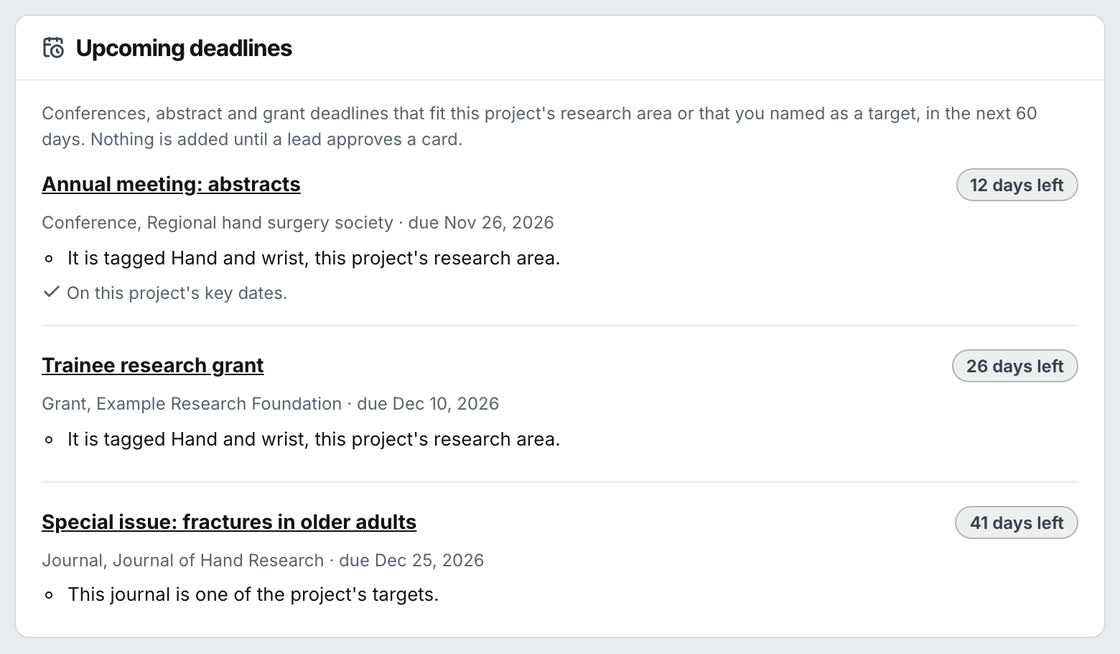
A coordinator chooses the fields the group follows and keeps one list of conference, journal and grant deadlines. Each project then shows the ones that match its research area, with the days left and the reason.

  • A project lead adds a deadline to the project's key dates in one click
  • Needs setup: the starter lists come without dates, so a coordinator checks each one against the official page first
The Upcoming deadlines panel on a project: a conference abstract deadline, a grant and a journal special issue, each with the days left and the reason it fits this project. Example data.
Example data

Apex, the built-in assistant

Ask where things stand

Ask Apex what is waiting on you or how a study is going. It answers from your group's projects, tasks and dates. It runs only when you ask, and it can see only what you can see.

  • Members can also connect their own AI assistant
  • AI spending is capped for each workspace
Example data

Also in every workspace

  • IRB status Where each project's IRB approval stands. It tracks the status only. It is not an IRB system.
  • Feed Updates, announcements and requests from across the group.
  • Library Guides, templates and links the group shares.
  • People and Messages Who is in the group and what they work on, with direct messages.
  • Manage For coordinators: open requests, how long each has waited, and which projects are stuck.
  • Public page A page for the group's published work.

For you

Your own research record, in every group you work with

Free for students and individual researchers. It is yours, not your department's.

My research

A CV that builds itself

Your CV starts from the projects, roles and presentations you already have in Anaxus. Link your ORCID iD and it checks ORCID and PubMed once a day for your papers. It asks "Is this yours?" before anything is added.

  • Download it as a PDF or copy it as text
  • Add by hand anything it does not find
Example data

Public profile

A page for your published work

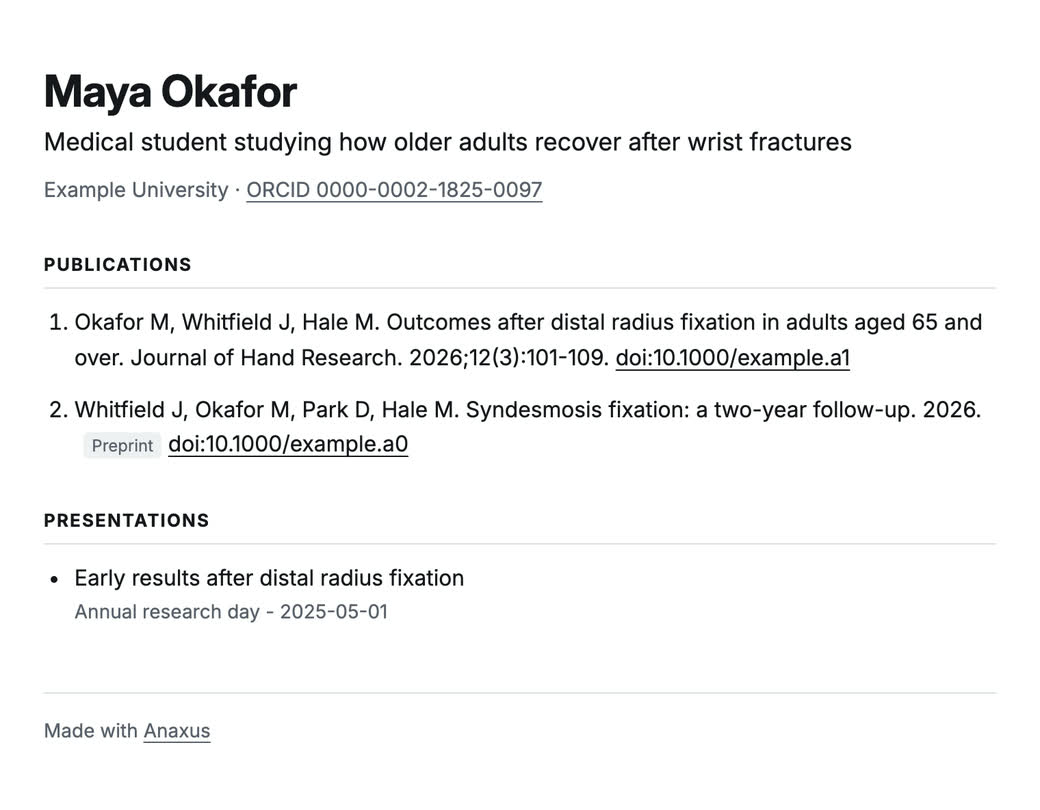
Turn on a public page at anaxus.app/u/your-name and choose, item by item, what it shows. Only published papers and posted preprints can appear. Work in progress cannot.

  • Off until you turn it on
  • A new page goes live the next time the site is published, not the same minute
A public profile page: the person's name, a one-line description, their school and ORCID iD, then a published paper, a preprint and a presentation. The footer says "Made with Anaxus". Example data.
Example data

One login

One Home for every group you are in

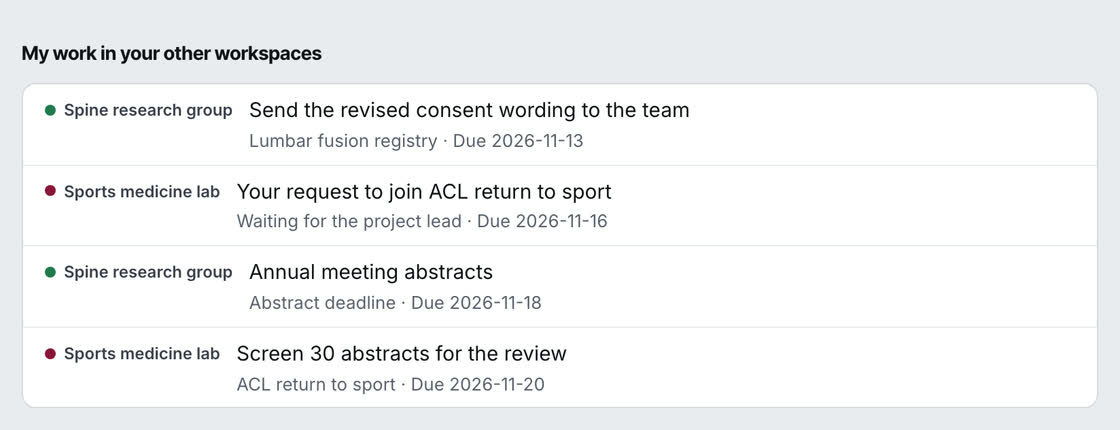
If you work with more than one group, link your workspaces once. Home then lists your tasks, deadlines and requests from each of them, marked with the workspace they come from. A switcher opens any of them without signing in again.

  • If one workspace is unavailable, the others still show
  • Needs setup: linking has to be turned on for each workspace
Home, under this workspace's own list: "My work in your other workspaces" shows a late task, a request, an abstract deadline and another task, each marked with the workspace it comes from. Example data.
Example data

Connections

Works with the tools you already use

Forward an email to your own private address and it becomes a task. The subject is the title, the message is the notes, and any files come with it.

  • Calendar: one private link that Google, Apple or Outlook Calendar subscribes to
  • Zotero: show one of your collections on a project, read-only, using your own Zotero key
  • Google Drive and OneDrive: link files to a task or a project
  • Overleaf: link the paper draft and open it from the project
  • Needs setup: a coordinator turns on incoming email for the workspace before email to tasks works
Example data

Plans and pricing

Two plans. A department pays for its workspace, and each person's own record is free.

For your research group

Department

$349 a month, or $3,490 a year

For a department or research group of up to 100 people.

  • Its own workspace, web address and database
  • Manage, the coordinator's tools, with import from a spreadsheet
  • Apex, with an AI budget and a cap the admin sets
  • Everything under "For you" for every member

Founding departments: $199 a month. The price stays locked for as long as you stay. For the first 10 departments.

Start with a 60-day pilot. It is free, and you decide at the end.

Request a workspace

For you

Personal

Free

For students and individual researchers.

  • Your CV and publication list
  • A public profile page
  • Your deadlines in one place
  • One Home for every group you are in

A paid personal plan is coming soon. We will list what it adds, and the price, when it opens.

Today you get a personal account through a group's workspace. Accounts for people who are not in a group yet are not open. Ask, and we will write to you when they are.

Ask for a personal account

How setup works for a department

There is nothing to install. Each department gets its own workspace at its own web address.

  1. 1

    Request a workspace

    Tell us your institution and your department or group.

  2. 2

    We set it up

    Your department gets its own address on anaxus.app and its own database. Nothing is shared with another department.

  3. 3

    Choose how people sign in

    Members use the Google or Microsoft account your institution already gives them.

  4. 4

    Move in from a spreadsheet

    A coordinator imports the group's projects, people and tasks from a CSV file, checks the preview before anything is saved, and invites the team.

Security and privacy

  • No patient data

    Anaxus tracks who is doing what and by when. It is not built to store protected health information, and members are asked not to enter any.

  • Each department is separate

    Every department's workspace has its own database. Different institutions never share a server.

  • Your institution's sign-in

    Members sign in with the account their institution already manages.

  • Only published work is public

    A group's public page and a person's profile page list published papers and posted preprints. Work in progress stays inside the workspace.

Read the security and privacy page

Set up a workspace for your group

Tell us about your group and we will reply by email. On your own? Use the same form to ask for a personal account.

Request a workspace